QloApps Forums
    • Register
    • Login
    • Search
    • Categories
    • Recent
    • Tags
    • Popular
    1. Home
    2. Technical Help
    Log in to post
    • Newest to Oldest
    • Oldest to Newest
    • Most Posts
    • Most Votes
    • Most Views
    • K

      HTTP Error 500
      http error 500 • • kalinprod

      5
      0
      Votes
      5
      Posts
      1910
      Views

      A

      @nchavan This issue has been resolved on the thread https://forums.qloapps.com/topic/873/http-500-error/7. Please follow the same.

    • 1.SQL error during installation
      1.sql error during installation • • ab

      8
      0
      Votes
      8
      Posts
      3043
      Views

      A

      @lilyandy The value of 60000 for max_input_vars is more than enough. QloApps shows warning if this value needs to be increased. What error message do you get when saving translations. Please share the screenshot for more details.

    • L

      Missing translation? And after translation, the translation cannot be displayed normally after partial refresh?
      • Lilyandy

      4
      0
      Votes
      4
      Posts
      1229
      Views

      A

      @lilyandy
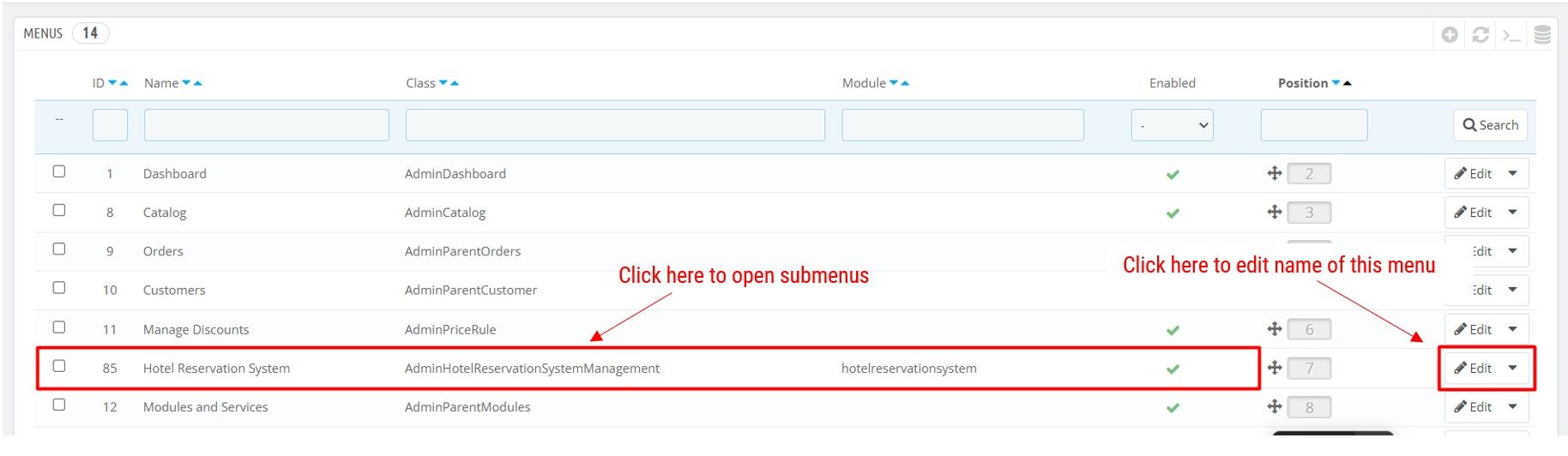
      The menu at the top and its submenu items can be translated from Administration > Menus. In order to edit name of a menu in any language, click in Edit button located at the right. To see submenus for a menu item, in your case Hotel Reservation System, click on the corresponding row to go to its submenu items. To edit name of a submenu item, again click Edit button located at the right. Refer to the screenshot below.

      Menu translation:
      1.jpg

      'Additional facilities':
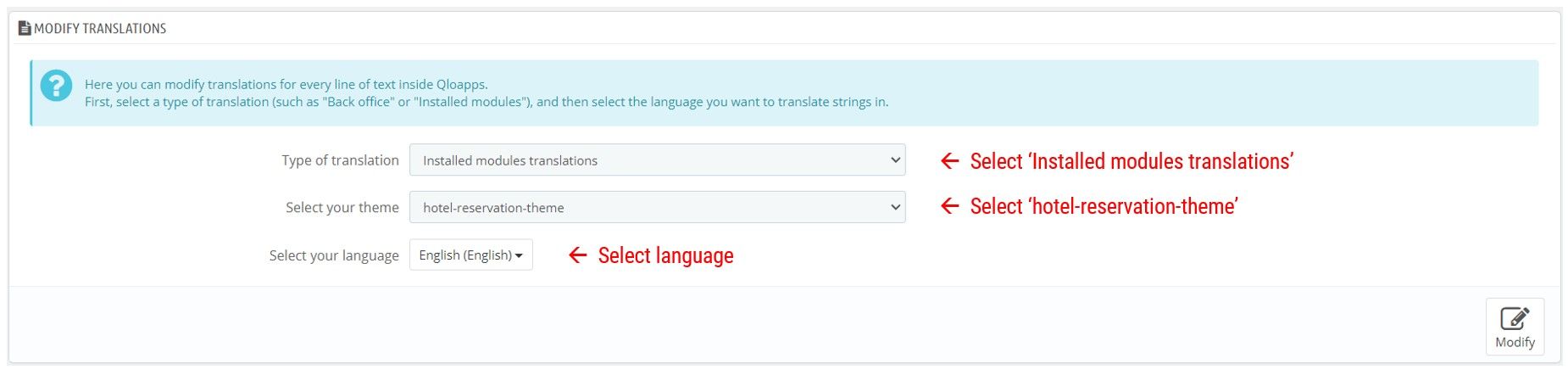
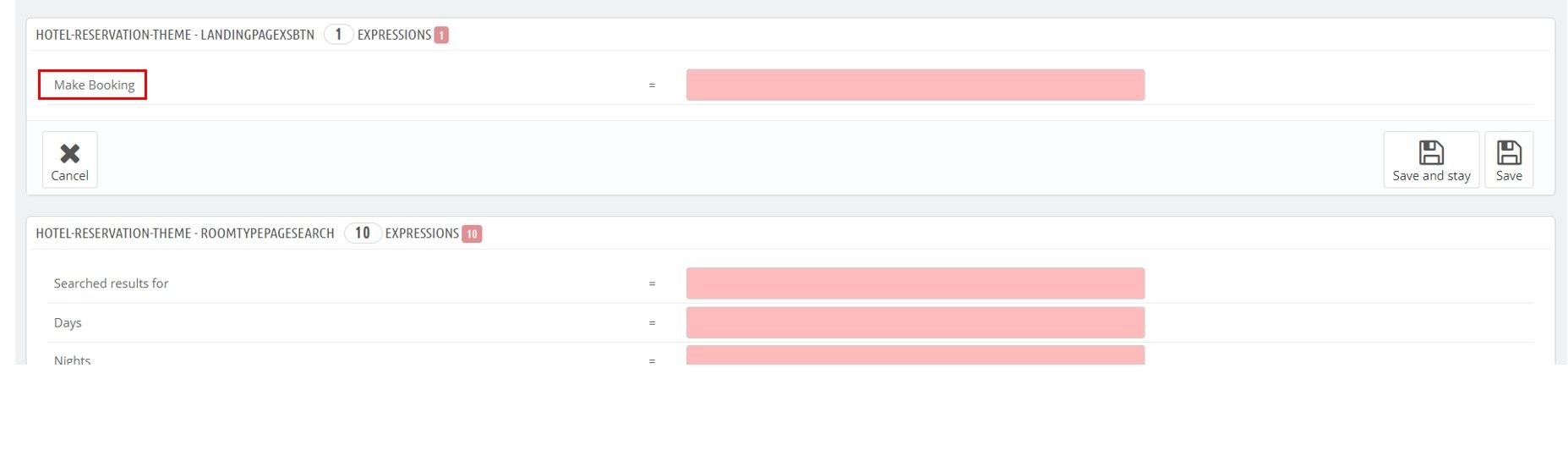
      Go to Localization > Translations page. Proceed with the installed modules translations for the theme 'hotel-reservation-theme' (important to choose this theme). Refer to the screenshot below.
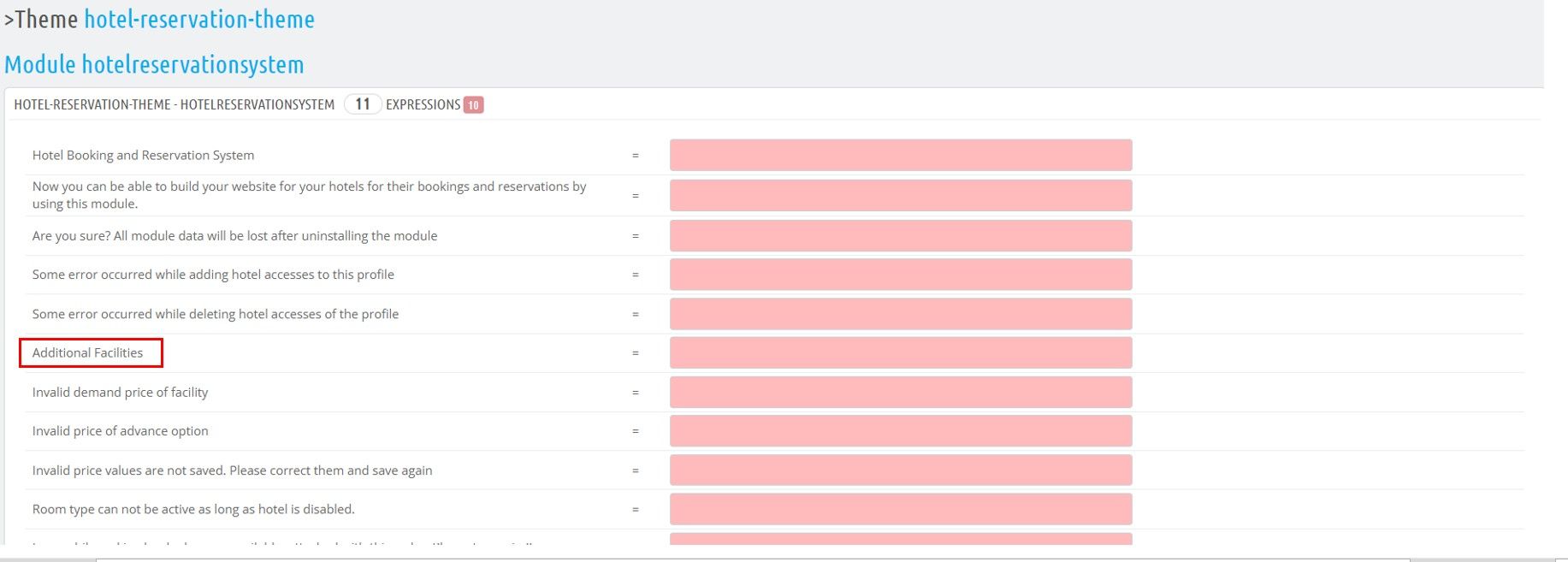
      Now edit the required texts under section 'Module hotelreservationsystem'.

      Select options:
      2.jpg

      Find text under corresponding module name:
      2b.jpg

      The modules responsible for the translations in the footer are as below. You can modify their required texts from Localization > Translations page.
      Display Language and Currency Block (wkfooterlangcurrencyblock)
      Footer Payment Accepted Block (wkfooterpaymentblock)
      Display about hotel block and payment block in footer (wkfooterpaymentinfoblockcontainer)
      Footer Subscription and Social Block (wkfooternotificationblock)
      Navigation block (blocknavigationmenu)

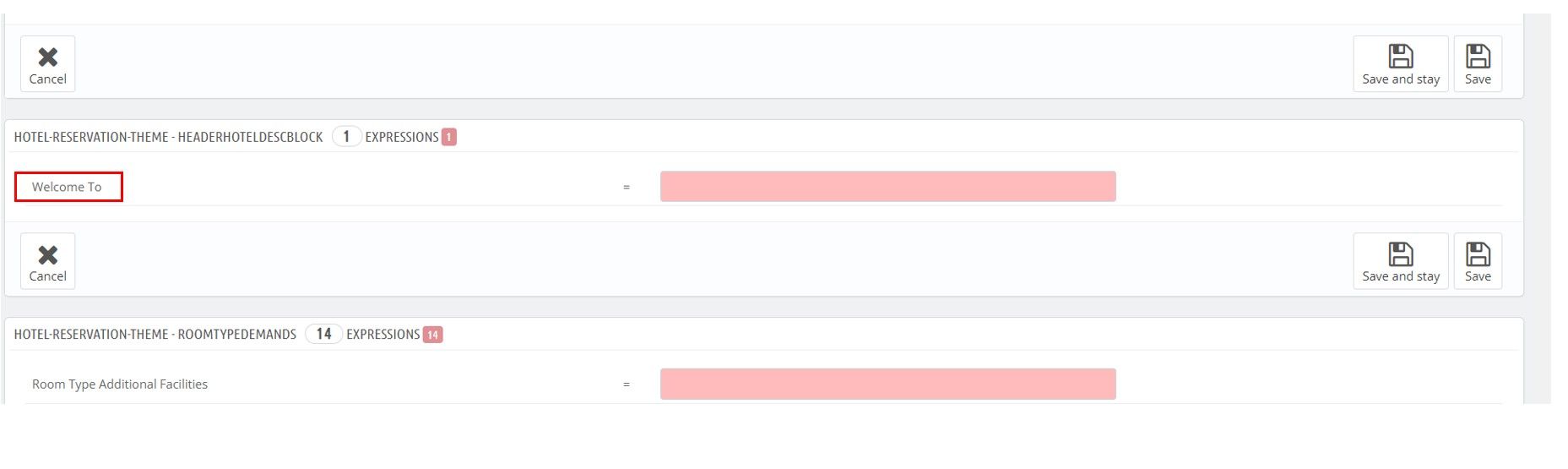
      Other translations:
      3.jpg

      4.jpg

      The javascript plugins datepicker and tinymce and room statuse strings are currently not translatable.

    • B

      Booking restriction
      • Birduser

      2
      0
      Votes
      2
      Posts
      756
      Views

      A

      @birduser Hello,
      Currently, this is not a default feature of QloApps but it is on our roadmap and it will be implemented in future versions.

      If you need this feature now then you can discuss it with our team here:

      https://webkul.uvdesk.com/en/customer/create-ticket/.

    • A

      Add the booking search box to ma externel site?
      • anna

      2
      0
      Votes
      2
      Posts
      923
      Views

      A

      Hello Anna,

      This is not the default feature of QloApps, but we can customize it for you.

      If you want to proceed with the customization then please raise a ticket at https://webkul.uvdesk.com/en/customer/create-ticket/.

      Thank you

    • S

      Installation problem in Mac XAMPP
      • screaming cow

      2
      0
      Votes
      2
      Posts
      766
      Views

      A

      @screaming-cow
      Hi,

      Please send the screenshots of the issue.
      It looks like a PHP version compatibility issue. Please go through the blog at https://qloapps.com/install-qloapps/#section-8 for detailed system configuration.

    • P

      Cannot see Room in configuration
      • protocol061

      3
      0
      Votes
      3
      Posts
      906
      Views

      J

      @protocol061 said in Cannot see Room in configuration:

      When I create room No in configuration, it doesn't display on page. It is hidden inside and the page remains as it is

      thanks my issue has been fixed.

    • M

      Fatal error: Uncaught Error: Class 'HotelBranchInformation'
      • Maurice

      3
      0
      Votes
      3
      Posts
      980
      Views

      M

      @akr Hi and thanks. Ticket created

    • F

      How to compose newsletter ?
      • Freeman

      2
      0
      Votes
      2
      Posts
      744
      Views

      A

      @Freeman Hello,

      In QloApps, we only gather data about customers whether they want to receive a newsletter or not.
      We do not compose or send newsletters.
      We just take the customer preference and save it.
      The way of sending a newsletter totally depends on the admin.
      For any other query, you can raise a ticket at: https://webkul.uvdesk.com/en/customer/create-ticket/.

    • M

      Suddenly Error 500 Started to show
      • Maurice

      3
      0
      Votes
      3
      Posts
      1265
      Views

      M

      @akr Thx. It is a security issue and I havent found where an how. It has happened to me two times in 6 months. I have recovered systems just creating the database user again on server and assigning to qlo databases again according to /config/settings.inc.php. Have changed passwords & users on databases and Cpanel but happened again. I just wanted to know if someone else had this issue. Thx again.

    • D

      Frustrating installation issues
      frustrating installation issues • • Daniel

      6
      0
      Votes
      6
      Posts
      3034
      Views

      A

      thanks for the awesome information.

    • R

      Book Now: Disable address requirement
      • robgillett

      2
      0
      Votes
      2
      Posts
      4295
      Views

      Faiz

      @robgillett Hello
      In the current version, the address field is mandatory. But in the next version, the address field will be in the Book Now workflow will be optional.

      We are working on the next version but cannot quote a time frame right now.

      So if you are in hurry then please raise a ticket: https://webkul.uvdesk.com/en/customer/create-ticket/

    • A

      FAKE AND SCAMMING REPORTING
      • alexd

      2
      0
      Votes
      2
      Posts
      865
      Views

      Faiz

      @alexd Thank you for pointing the id to us. We have banned the id and will take necessary steps.

    • H

      Selling Individual Item For Current Guests
      • HeartValley

      5
      0
      Votes
      5
      Posts
      1333
      Views

      Faiz

      @heartvalley We do offer a feature in which you can display additional facilities and sell them along with your rooms. The customer will be able to select the service or a product to the cart from the Room type page or the checkout page.

      Please check this link for more details: https://qloapps.com/qlo-reservation-system/#section-12

      But if you want to just sell tickets which will be available for just one day then there will be a custom development required and it is up to you if want to do it yourself or want our help.

    • P

      Beverage items
      • protocol061

      2
      0
      Votes
      2
      Posts
      706
      Views

      Faiz

      Hi @protocol061

      Could you please send me how can I initiate a refund?

      QloApps comes with Refund Rules through which you can manage the refunds. Please click here for more details: https://qloapps.com/qlo-reservation-system/#section-35

      add beverages at the time of checkout

      We do offer a feature in which you can display additional facilities and sell them along with your rooms. The customer will be able to select the service or a product to the cart from the Room type page or the checkout page.

      Please check this link for more details: https://qloapps.com/qlo-reservation-system/#section-12

    • N

      "Manage your Customers" list is empty for other employers
      • nickfirouzi

      2
      0
      Votes
      2
      Posts
      759
      Views

      S

      In QloApps permissions are managed hotel-wise, employees can only access data for the only hotel they have permission.

      In the case of customers, an employee and only see customers who have created an order in the hotel they have permission for.

    • Z

      Where to find Rss URL
      where find rss url • • zayno70

      8
      0
      Votes
      8
      Posts
      2130
      Views

      MasonHick

      Right click on the website's page, and choose Page Source. In the new window that appears, use the “find” feature (Ctrl + F on a PC or Command + F on a Mac), and type in RSS. You'll find the feed's URL between the quotes after href=.

    • M

      Tour package
      • Maurice

      4
      0
      Votes
      4
      Posts
      1050
      Views

      A

      Hello,

      We have to check the issue on your server, so please share the FTP details on the ticket.

    • H

      Pay with cash
      • huybao

      2
      0
      Votes
      2
      Posts
      730
      Views

      A

      Hello,

      We have QloApps Pay At Hotel add-on that will bring the functionality of making the payments at the hotel itself while check-in.

      This module adds a payment option for customers to book hotel rooms without entering card details or making online payments and gives an option for paying at the hotel during check-in.

      To view its demo click here: https://moduledemo.qloapps.com/qloapps150_demos/content/6-qloapps-pay-at-hotel

    • T

      missing translation
      missing translation • • tien95

      26
      0
      Votes
      26
      Posts
      17064
      Views

      Faiz

      @applezop Yes, we have also created an addon for Google Translate. With the help, of this addon, you will be able to autofill the translations at the backend.
      Here are more details: https://qloapps.com/qloapps-google-translate-translate-qloapps-easily/