QloApps Forums
    • Register
    • Login
    • Search
    • Categories
    • Recent
    • Tags
    • Popular
    1. Home
    2. Technical Help
    Log in to post
    • Newest to Oldest
    • Oldest to Newest
    • Most Posts
    • Most Votes
    • Most Views
    • B

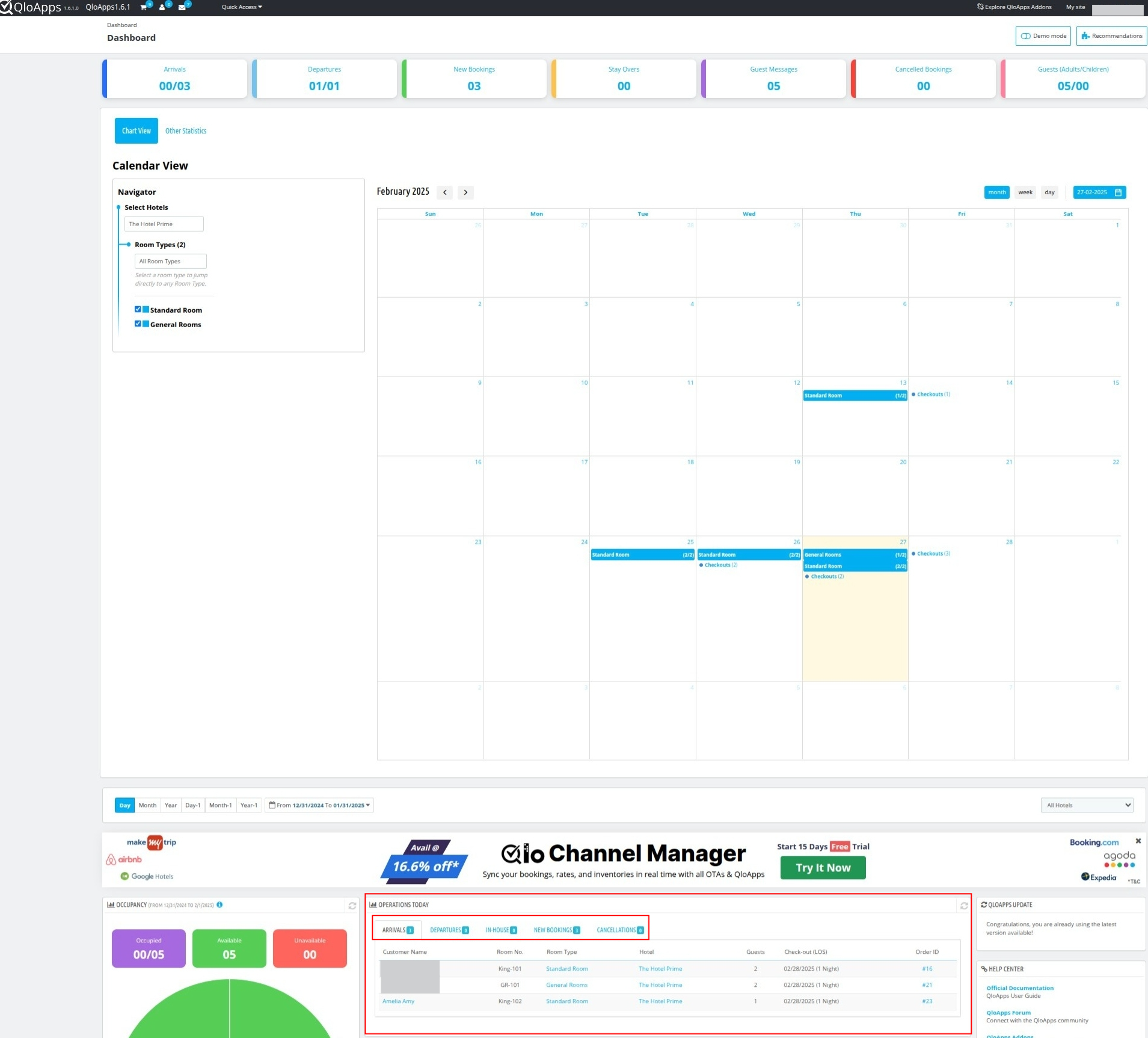
      Front Desk addon module do not show operations today like in regular dashboard
      • bernie

      2
      0
      Votes
      2
      Posts
      1036
      Views

      A

      Hi @bernie,

      Please refer to the image given below:
      screenshot_1740664566490.png

      The operations statistics, such as arrival and departure data along with guest names and room numbers, are displayed under "Operations Today."

      If you were referring to something else, please provide more details.

    • C

      Configuration missing in the Edit option of Manage Room Type
      • clicker

      2
      0
      Votes
      2
      Posts
      1185
      Views

      V

      Hi @clicker,

      In QloApps 1.6.1.0, the "Configuration" setting has been renamed to "Rooms" for better clarity and usability.

    • C

      While click invoice tab.php error
      • csugesh

      3
      0
      Votes
      3
      Posts
      1063
      Views

      V

      Hi @csugesh,

      To resolve this issue, please refer to the following PR: PR Link.

    • C

      QloApps Data Cleaner is missing in 1.6.1
      • clicker

      4
      0
      Votes
      4
      Posts
      1192
      Views

      V

      Hi @clicker,

      Please try searching again using "Cleaner" or "QloApps Data Cleaner" in the modules catalog page, ensuring there are no extra spaces in the search input.

      If the issue persists, please create a ticket at UVdesk Support so our team can assist you accordingly.

      Thanks!

    • I

      Book Now - not adding to cart
      • irfan

      16
      0
      Votes
      16
      Posts
      3882
      Views

      A

      To resolve issue on the "Book Now" page where rooms are not being added to the cart.

      Use the following PR: Pr Link

    • M

      google map issue
      google map issue • • mersiuse

      7
      0
      Votes
      7
      Posts
      2449
      Views

      H

      @homestay-lanka Hi Amen

      Thank you for your response. I successfully added the map and learned something new in the process. I had never used F12 to debug the output before, but with its help, I was able to identify the issue. I recreated the key, and it worked. Although I have recreated the MAP key a few times before, I think I may have made some mistakes in the steps previously.

    • K

      index.php loading time
      • kominstein

      2
      0
      Votes
      2
      Posts
      1037
      Views

      A

      Hi @kominstein ,

      Yes, Cloudflare provides a CDN service, which is why the website loads faster when using a Cloudflare domain compared to one without it.

      To speed up the first domain, you can configure caching mechanisms on server to enhance website performance.

      Additionally, you can ask your hosting provider to improve network latency for better load times.

    • L

      The QloApps Front Desk System module does not work.
      • litri123789

      2
      0
      Votes
      2
      Posts
      725
      Views

      S

      @litri123789

      The issue might be occurring due to version compatibility with the new QloApps version.
      Please create a ticket at https://support.uvdesk.com/en/customer/create-ticket/ so our team can check the issue you accordingly.

    • T

      How to make Extra service field editable in Cart Details.
      • timothymuvuti

      2
      0
      Votes
      2
      Posts
      671
      Views

      A

      Hi @timothymuvuti,

      You cannot directly make the Extra Services / Fees (tax excl) field editable.

      But, you can use QloApps Service Product feature to achieve this by following these simple steps:

      1) Create a Service Product Screenshot

      2) Configure Auto Add to Cart: Change the service product settings so that it automatically adds to the cart when a user books a room.Screenshot

      3) Select Price Display Options: Choose how you want the price to be displayed to your customers.

      4) Explore Additional Options: Feel free to adjust other settings as needed, and then save the service product.

      5) Attach the service product to room types for which you want it to apply.Screenshot

      Also you can attach the service product to Room type from Room type page.Screenshot

      Now create the Booking from Book Now page. Add the service product to the room type. If the service product is selected as "Auto add to cart" which i have mention in the 2 point you dont have to add it manually.Screenshot.

      Service product will get automatically added to the cart.

      You can also edit the service product price after creating the order from the order page Screenshot

      To read more about the service product refer to the documentation link given

      Documentation link
    • R

      unable to see images preview
      unable images preview • • Rahul

      9
      0
      Votes
      9
      Posts
      2505
      Views

      K

      @Aman-deep-sharma

      Noted with thanks
      It may required when commercially launch the site.

      Regards/

    • T

      Can you please add Zambia to hotel country list and localization tab.
      • timothymuvuti

      2
      0
      Votes
      2
      Posts
      665
      Views

      A

      Hi @timothymuvuti,

      Currently, Zambia localization pack is not available in QloApps but you can manually manage to create Loacalization pack for Zambia. Also, there can be more countries Localization pack which may be not available in QloApps .

      But no need to worry you can create it by just following the steps given below:

      Add a language for the country. Add currency for the country. Add taxes for the country.

      However, Zambia is available in QloApps as a country shown in the Screenshot.

      Kindly enable Zambia as the country so that you can use it as a country.

      Refer to the following screenshots for guidance:

      Screenshot 1 Screenshot 2
    • T

      Country Localization
      • timothymuvuti

      2
      0
      Votes
      2
      Posts
      619
      Views

      A

      Hi @timothymuvuti,

      Regarding your concern, we have confirmed that there is no separate localization pack available for Zambia.

      However, Zambia is available in QloApps as a country shown in the Screenshot.

      Kindly enable Zambia as the country so that you can use it as a country for your hotel.

      Additionally, you will need to manually add the currency and language for Zambia.

      Refer to the following screenshots for guidance:

      Screenshot 1 Screenshot 2
    • T

      Removing Banner
      • timothymuvuti

      2
      0
      Votes
      2
      Posts
      588
      Views

      A

      Hi @timothymuvuti,

      You can close the banner by clicking the cross icon in the top right corner for some time.

      If you’d like to permanently remove the banner from your dashboard, please create a ticket at https://support.uvdesk.com/en/customer/create-ticket/ so our experts can assist you further.

    • I

      Cash received after check in
      • irfan

      2
      0
      Votes
      2
      Posts
      589
      Views

      A

      Hi @irfan,

      Yes, it is possible.

      If you don’t see your payment method in the "Payment Method" field, you can simply write the name of the method, such as "Payment in Cash"

      Refer to the screenshots given below:

      Screenshot 1 Screenshot 2

      This ensures that your order pricing will always be accurate and up to date.

    • L

      New Hotel Permission cannot be added to existing profiles
      • leokonwar

      8
      0
      Votes
      8
      Posts
      2531
      Views

      A

      Hi @Ananth,

      You don't have to find the query you just need to run the given SQL in your database to fix the issue. You can do this by your own or you can ask from you host provider to execute this query on your database.

      SQL query :

      INSERT INTO `prefix_htl_access` (`id_profile`, `id_hotel`, `access`) SELECT p.`id_profile`, h.`id` AS `id_hotel`, CASE WHEN p.`id_profile` = 1 THEN 1 ELSE 0 END AS `access` FROM `prefix_profile` p CROSS JOIN `prefix_htl_branch_info` h LEFT JOIN `prefix_htl_access` ha ON (p.`id_profile` = ha.`id_profile` AND h.`id` = ha.`id_hotel`) WHERE ha.`id_profile` IS NULL;

      But make sure to replace 'prefix' in the SQL query with your table prefix so that SQL query can run correctly. Whenever the QloApps installed you have to mention the Table prefix at the time of installation.

      To find your table prefix, follow these steps:

      Navigate to the "Advanced Parameters -> Configuration Information" Tab. Refer to the screenshot

      Obtain the table prefix from the Configuration Information page. Refer to the screenshot

      Once you've completed the above step, then merge the following PR: https://github.com/Qloapps/QloApps/pull/729

    • T

      Extra Services
      • Thanks4that

      2
      0
      Votes
      2
      Posts
      604
      Views

      A

      Hi @Thanks4that

      Currently, there isn’t an option to display extra services under the final total box on the order checkout page.

      If you’d like, please create a ticket at https://support.uvdesk.com/en/customer/create-ticket/ so our team can assist you further.

    • T

      Take a deposit with a booking
      • Thanks4that

      3
      0
      Votes
      3
      Posts
      803
      Views

      T

      @Aman-deep-sharma That's great, thank you every so much.

    • D

      New profiles
      • djaber

      5
      0
      Votes
      5
      Posts
      1023
      Views

      D

      @Aman-deep-sharma
      Ok thank you!

    • T

      Add text block or button to home page
      • Thanks4that

      2
      0
      Votes
      2
      Posts
      589
      Views

      A

      Hi @Thanks4that ,

      You can not directly add text block or a button to link to another page.

      However, you can use the Navigation Module to create links to other pages.

      Follow the steps given:

      In the admin panel, go to Module and services -> Manage Module

      Search for Navigation Block module screenshot

      Click on the configuration. Here you can Add or Edit the custom nvaigation links. screenshot

      After creating your custom navigation links, they will appear in the footer and menu bar of your website.

      Screenshot 1 Screesnhot 2

      Also, you can create ticket at https://support.uvdesk.com/en/customer/create-ticket/ so our team can assist you further with your problem.

    • J

      Hotel Reservation/System Book Now not showing for employee
      • javaspline

      2
      0
      Votes
      2
      Posts
      576
      Views

      A

      Hi @javaspline

      This is about hotel permissions for employees.

      Please check this forum link:
      New Hotel Permission Cannot Be Added to Existing Profiles.

      Follow the steps there, and it should help solve your issue.

      Let us know if it works!