QloApps Forums
    • Register
    • Login
    • Search
    • Categories
    • Recent
    • Tags
    • Popular
    1. Home
    2. Technical Help
    Log in to post
    • Newest to Oldest
    • Oldest to Newest
    • Most Posts
    • Most Votes
    • Most Views
    • M

      Can't login in admin
      • Maurice

      5
      0
      Votes
      5
      Posts
      1159
      Views

      A

      @maurice
      Hi,

      What we have gathered so far is that you have tried migrating your website which is not a direct process but involves multiple things like changes in database and in the file system. We are happy that your issue has been resolved and hope that your system keeps working fine.

    • M

      Minimum nights and minimum preparing time
      • Maurice

      9
      0
      Votes
      9
      Posts
      2343
      Views

      M

      @faiz Hi. Thank you very much again. I will keep you posted.

    • M

      From rooms page to room detail in same page and header height
      • Maurice

      3
      0
      Votes
      3
      Posts
      804
      Views

      M

      @akr . Merci beaucoup Monsieur.

    • D

      SMTP DONT WORK.
      • dhiogojv

      5
      0
      Votes
      5
      Posts
      1294
      Views

      A

      @dhiogojv Hi,

      Please make sure you are entering your credentials correctly.

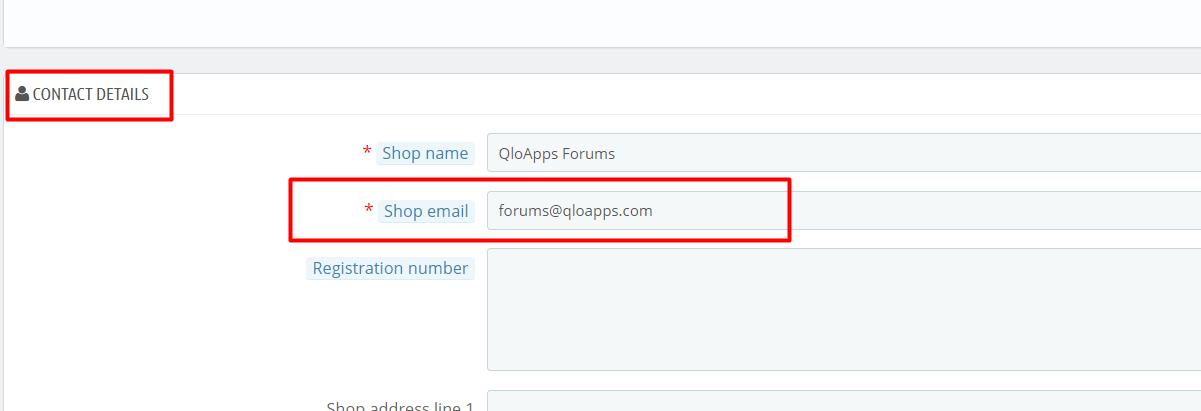
      If issue still remains unsolved, please confirm that your Website contact email is from the same domain which you are trying to configure.
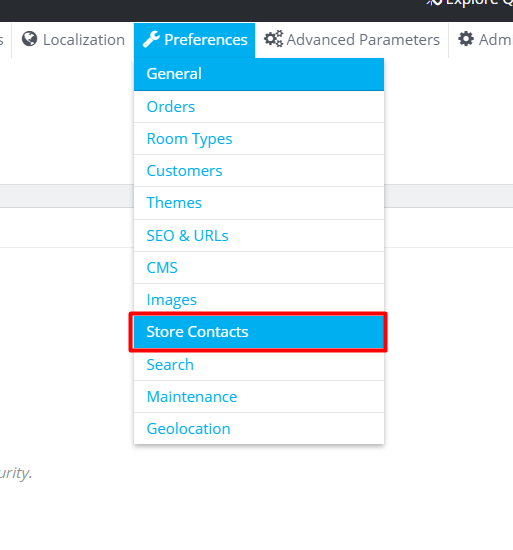
      Go to Preferences > Store Contacts and then check under Contact Details for Shop Email.

    • M

      Getting an error at 67% - Modules installation
      • mario

      2
      0
      Votes
      2
      Posts
      591
      Views

      A

      @mario Please refer to the following thread on similar issue.
      https://forums.qloapps.com/topic/12/error-during-installation-install-modules-an-error-occurred-during-installation

      Let us know if it resolves your issue.

    • A

      Adding qloApps to html website
      • amancha

      2
      0
      Votes
      2
      Posts
      724
      Views

      Faiz

      Hello @amancha
      Yes, it is possible to integrate QloApps with your current website. If you know how to develop on QloApps then you can do it and if you want us to do this integration then raise a ticket at https://webkul.uvdesk.com/en/customer/create-ticket/

    • A

      Installation error at 12%
      installation error • • AnteeStenc

      5
      0
      Votes
      5
      Posts
      1724
      Views

      A

      @anteestenc i get the same error but i get back and first i check the connection to the database. when it says successful the error goes away.

    • F

      Old version of website still showing
      • freedomoclock

      2
      0
      Votes
      2
      Posts
      703
      Views

      A

      @freedomoclock I can not tell you the exact reason for this problem but it looks like some server related configuration issue or .htaccess file issue.
      Firstly, I recommend you to please contact your hosting provider regarding this.

      If issue still persists then I recommend you to install QloApps in a new directory outside of any previous QloApps installation directories.
      For eg: If your old installation was located at: .../dir/QloApps_Old, I recommend using a new directory for example: ../dir1/QloApps_New.

      After this, If issue remains unresolved please raise a ticket at https://support.uvdesk.com/en/customer/create-ticket/ and provide your FTP details and admin login credentials so that we can check it on your server.

      Thanks

    • B

      PHP configuration set upload_max_filesize to minimum 16M
      • bharathv

      4
      0
      Votes
      4
      Posts
      1174
      Views

      A

      @bharathv Please run phpinfo() in the QloApss installation directory and check for the value of 'upload_max_filesize' directive. Please make sure it is greater than 16M.

    • B

      how to show hotel name in invoice
      • bdulharis

      5
      0
      Votes
      5
      Posts
      1241
      Views

      S

      @bdulharis

      Yes the approach you suggested was right, we are going to raise a new PR for this with some additional changes in invoice.

      Also thanks for being an active member on QloApps forum.

    • U

      "your new order was not accepted"
      • user123

      4
      0
      Votes
      4
      Posts
      1108
      Views

      S

      @user123

      "Catalog mode" is not available in 1.5, it is ion development. Please check if you have disabled "Show prices" for that coustomer group (https://prnt.sc/10fv238). Enable this option and check again, the issue will be resolved.

    • P

      How to translate abbreviations of months and days of the cart summary
      • Plankto

      3
      0
      Votes
      3
      Posts
      946
      Views

      P

      @shreesh Thanks! I changed the date texts to a numeric form.

    • P

      Live Edit
      • protrapper

      2
      0
      Votes
      2
      Posts
      628
      Views

      Faiz

      @protrapper To restore the modules which you have deleted in the live edit you will have to go to the Modules and Services Tab --> then click on Positions.

      Here you will find the Transplant a module button, click on it.
      https://prnt.sc/yeks0o

      Now select the module you want to restore then select where you want to transplant the module and click save.

      You can also enter any exception if you do not want to display this module on any file.

      https://prnt.sc/yel8vm

      Now go to the frontend and refresh the page.

    • A

      Are these options possible without extensions or changes to the code ?
      • Andreas

      4
      0
      Votes
      4
      Posts
      982
      Views

      Faiz

      @andreas Hi,
      Well, the feature is on our roadmap. As an open-source community, we are trying to add as many features to the system as we can but that happens as per its own timeline. And that's how the open source communities work.

    • P

      Installation problem in Mac XAMPP local
      • peterxwl

      2
      0
      Votes
      2
      Posts
      1067
      Views

      S

      @peterxwl

      This issue occurs due to file access permissions.

      Please try the solution provided in the following post
      https://forums.qloapps.com/topic/332/xampp-installation-not-working/3

    • ?

      Gloapps on local network
      • A Former User

      3
      0
      Votes
      3
      Posts
      865
      Views

      ?

      Thanks @faiz. I have install qloapps and it is running very nice. I just wanted to access from a client computer so that I distribute functionalities to my employees.

    • P

      This topic is deleted!
      • protrapper

      1
      0
      Votes
      1
      Posts
      4
      Views

      No one has replied

    • C

      how-to-set up google-analytics
      how-to-set • • cemarne

      5
      0
      Votes
      5
      Posts
      1200
      Views

      S

      @MMar

      You only need to provide the Tracking id in the module, no need to configure anything in the Google API console.

      do note that you need to add the complete tracking id (i.e UA-123456789-1) as displayed on the google analytics console.

      If you still face the issue, please raise a ticket at https://webkul.uvdesk.com/en/customer/create-ticket/
      And on the ticket please share your QloApps Credentials and FTP details so that we can look into the issue.

    • S

      Running install for first time returns fatal error
      500 fatal error aws install • • simonkemp

      3
      0
      Votes
      3
      Posts
      1247
      Views

      S

      @shreesh Perfect.
      All working now.
      Thank you!

    • P

      Backend booking
      backend booking • • protrapper

      9
      0
      Votes
      9
      Posts
      2677
      Views

      Faiz

      Hi @protrapper Okay please raise a ticket.