QloApps Forums
    • Register
    • Login
    • Search
    • Categories
    • Recent
    • Tags
    • Popular
    1. Home
    2. Recent
    Log in to post
    • All categories
    • All Topics
    • New Topics
    • Watched Topics
    • Unreplied Topics
    • D

      How to display build files
      Technical Help • • daicie

      2
      0
      Votes
      2
      Posts
      1318
      Views

      S

      @daicie

      We cannot confirm the exact issue but in your current code snippet we found the following errors

      $appContent is not defined anywhere in the hook. qloAngular_calendar.tpl template is called multiple times which is not required, also the variable $calendarContent is not used anywhere. // The following code is not required as $this->display() function fetches and returns the passed template by default. $calendarContent = $this->context->smarty->fetch($this->local_path . 'views/templates/hook/qloAngular_calendar.tpl');

      Please enable debug mode which will help in further debugging the issue
      https://devdocs.qloapps.com/introduction/configuration.html#debug-mode-error-reporting

    • K

      Update
      General Discussion • • KemarArt

      4
      0
      Votes
      4
      Posts
      2118
      Views

      A

      Hi @KemarArt ,
      Yes, the QloApps is an independent platform like WordPress and OpenCart.
      QloApps offers addons and themes that you can install on the top of default QloApps. You can check all our addons and themes from the following links:

      QloApps Addons: https://store.webkul.com/Qloapps.html
      QloApps Themes: https://store.webkul.com/catalogsearch/result/?cat=159&q=themes

      If you have any further queries, Kindly raise a ticket here: https://webkul.uvdesk.com/en/customer/create-ticket/

    • S

      Change URL
      General Discussion • • selekta

      2
      0
      Votes
      2
      Posts
      1578
      Views

      S

      We assume that QloApps is already installed, and you are in the process of migrating QloApps to a new URL or domain. Here are the steps to update the URL:

      Access the QloApps back office directly from the new URL. Navigate to Preferences -> SEO tab. In the SEO page, locate the "Set Shop Url" section. Update the website domain and Base URL. You can refer to this screenshot for visual guidance. Once you've updated the URL, check the front end to ensure it works correctly on the new URL.

      If you encounter issues changing the URL through the back office, you may need to update the database directly. Follow these steps:

      Access the PREFIX_shop_url table in the database. Update both the "domain" and "domain_ssl" fields with your new website domain. Update the "physical_uri" field with the base path to your QloApps directory. You can refer to this screenshot for clarification.

      After updating the database table, QloApps should work with the new URL. We recommend updating the domain from the SEO tab as well. This will update configurations and .htaccess files to align with the new URL.

      If you have any further questions or encounter issues during this process, feel free to seek additional assistance.
    • V

      Installation error
      Technical Help • • vacs03

      4
      0
      Votes
      4
      Posts
      2178
      Views

      A

      Hi @vacs03 ,

      Kindly extract all the content of the zip and paste it into the "public_html" folder. After that when you hit your public URL you can you will automatically be redirected to the installation page.

      Or, you can create a subfolder in "public_html" and paste the content of the Zip in it. Then your URL will be https://domain.com/foldername/

      I hope this helps.

      Thanks

    • D

      Map Pinpoint
      Technical Help • • Denzel 0

      2
      0
      Votes
      2
      Posts
      1215
      Views

      D

      Hi @Denzel-0,

      In default QloApps, you can display the hotel location on Google Maps but the price and image slider of the hotel will not be displayed on the map. To discuss your requirement further in detail, I request you to kindly create a ticket from here: https://webkul.uvdesk.com/en/customer/create-ticket/

    • R

      QloApps Error
      Technical Help • • rmorrisfj

      2
      0
      Votes
      2
      Posts
      1301
      Views

      A

      Hi @rmorrisfj,

      QloApps supports MariaDB version 10.6.14.

      The problem you're encountering is a result of an external Softaculous script running before the installation of QloApps on their system. It's important to note that this error is not originating from QloApps itself.
      To address and resolve this issue, we recommend reaching out to the Softaculous support team.

    • R

      Required MARIADB version less than 10.5.0
      Technical Help • • rmorris

      5
      0
      Votes
      5
      Posts
      2892
      Views

      A

      Hi @Abram ,

      QloApps supports MariaDB version 10.6.14.

      The problem you're encountering is a result of an external Softaculous script running before the installation of QloApps on their system. It's important to note that this error is not originating from QloApps itself.
      To address and resolve this issue, we recommend reaching out to the Softaculous support team.

    • J

      Tax breakdown not calculating properly with discount applied
      Bug Report • • Johnny

      2
      0
      Votes
      2
      Posts
      2886
      Views

      A

      Hi @Johnny,

      Thank you for raising this issue, Our dedicated team is looking into it and we will update you once the issue is resolved.

      Regards,
      QloApps Team

    • D

      Revenue Statistics
      Technical Help • • Dae

      12
      0
      Votes
      12
      Posts
      6131
      Views

      S

      @Dae

      We have resolved this issue on github.

      Please make the changes done in the following PR, To resolve the issue on your QloApps,
      https://github.com/webkul/hotelcommerce/pull/868

    • D

      Tours and Packages
      Technical Help • • Denzel

      2
      0
      Votes
      2
      Posts
      1503
      Views

      S

      @Denzel

      In the current Tour and Packages module, the tours can be filtered base on duration, price, themes, and activities.
      If you have any specific requirements that you want to be customized, please raise a ticket so that we can discuss it further: https://webkul.uvdesk.com/en/customer/create-ticket/

      Also please check the workflow of Tour and Packages module from this blog : https://qloapps.com/qloapps-tours-and-packages/

      All email in QloApps can be customized using the translation page in QloApps back office
      Here is the detailed guide that can help you: https://qloapps.com/managing-translations-in-qloapps/

    • D

      ORDER SOURCE
      Technical Help • • Dae

      3
      0
      Votes
      3
      Posts
      2014
      Views

      D

      @shreesh Thank you very much.
      Understood

    • D

      PAY WITH WITH CASH
      Technical Help • • Dae

      2
      0
      Votes
      2
      Posts
      1551
      Views

      S

      @Dae

      You can check our QloApps Pay at Hotel module which adds an option for for making payments at the hotel itself while check-in.

      Using this module the customer as well as the admin will get on option to select pay at hotel option while creating a booking

      Module Link : https://store.webkul.com/QloApps-Pay-at-Hotel.html

    • D

      Previous Bookings
      Technical Help • • Dae

      2
      0
      Votes
      2
      Posts
      1355
      Views

      S

      @Dae

      This feature is currently not available by default in QloApps.

      If you want this feature in QloApps, please raise a ticket so that discuss it through.
      https://webkul.uvdesk.com/en/customer/create-ticket/

    • D

      Help center
      General Discussion • • Dae

      2
      0
      Votes
      2
      Posts
      1462
      Views

      S

      @Dae

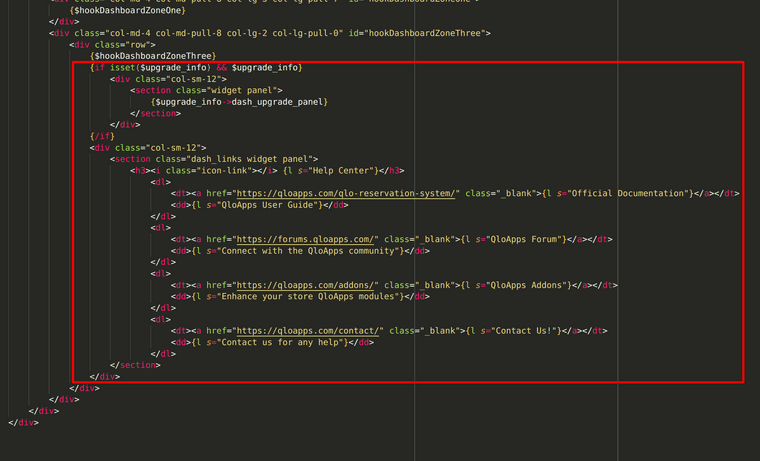
      To remove the help center and update option from the dashboard, you will need to comment on these panels from the dashboard template file located at : /adminXXX/themes/default/template/controllers/dashboard/helpers/view/view.tpl

      In this file comment the blocks below
      {$hookDashboardZoneThree}
      Screenshot (6).png

    • D

      Long term rental
      Technical Help • • Dae

      2
      0
      Votes
      2
      Posts
      1490
      Views

      D

      @Dae, Yes you can definitely use QloApps if you have fixed rental property by making a few changes in the booking duration feature of QloApps. You can make changes yourself or if you want we can customize QloApps for you as per your requirements. I request you to Please create a ticket at https://webkul.uvdesk.com/en/customer/create-ticket/ and share your complete requirements over there.

    • A

      Hotel management for travel agent
      Technical Help • hotel management travel agent • • addmakes02

      3
      0
      Votes
      3
      Posts
      2491
      Views

      I

      @addmakes02To determine if a platform supports travel agents in booking hotels and securing special prices for hotel rooms, you would need to research and contact the specific platform or service you are inquiring about. Many hotel booking platforms do offer partnerships and special pricing options for travel agents, but the availability and terms may vary from one platform to another.

      I would recommend visiting the official website of the platform you are interested in or contacting their customer support to inquire about their specific offerings and support for travel agents. They will be able to provide you with the most accurate and up-to-date information regarding their services and how they can assist travel agents.

    • D

      DEMO BUTTON
      Technical Help • • Dae

      2
      0
      Votes
      2
      Posts
      1356
      Views

      S

      @Dae

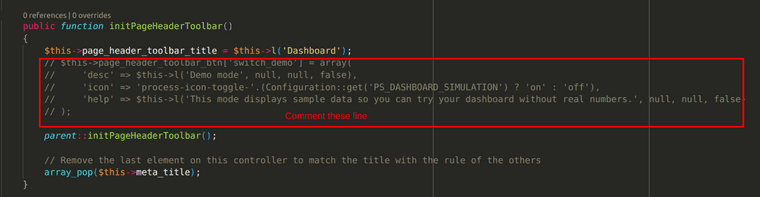
      To remove demo button from dashboard you will need to comment page_header_toolbar_btn property with "switch_demo" key from AdminDashboardController.php.
      Screenshot (2).png

      To remove recommended modules button from the dashboard, create a new override function addPageHeaderToolBarModulesListButton() in AdminDashboardController.php.
      In that override function simply return false to override the addition of recommended modules button.
      Screenshot (3).png

    • O

      HTTP ERROR 500
      Technical Help • • olip

      2
      0
      Votes
      2
      Posts
      1455
      Views

      S

      @olip
      Please enable debug mode and provide us with screenshots of the error message.

      To Enable debug mode, check the following thread: https://devdocs.qloapps.com/introduction/configuration.html#debug-mode-error-reporting.

    • V

      Admin Page 404 error
      Technical Help • error • • vsappati

      2
      0
      Votes
      2
      Posts
      2358
      Views

      S

      @vsappati
      It seems you are using the wrong URL to access the admin panel. Try opening http://localhost:8001/admin/

      Also if you have opened the admin panel once, the admin URL would have been updated for security purpose. so I request you to once check the admin folder (in your QloApps directory structure find the folder whose name starts with admin) and use that folder name for accessing the admin panel : http://localhost:8001/admin_folder_name/

    • M

      Can't approve hotel
      Technical Help • • miqyk

      3
      0
      Votes
      3
      Posts
      1802
      Views

      M

      @Archit-Chandra I solved the issue. Thank you.
